




Unfollow at a safe pace
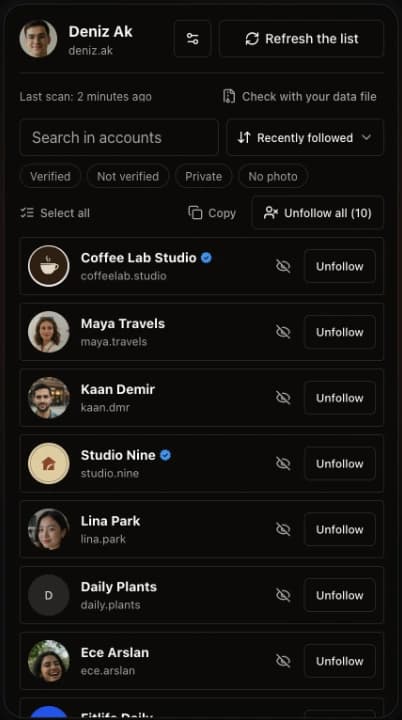
Select a few accounts or all of them. By default Unfolks waits 4–6 seconds between unfollows and rests 3 minutes after every 5, and you can change both in Settings.
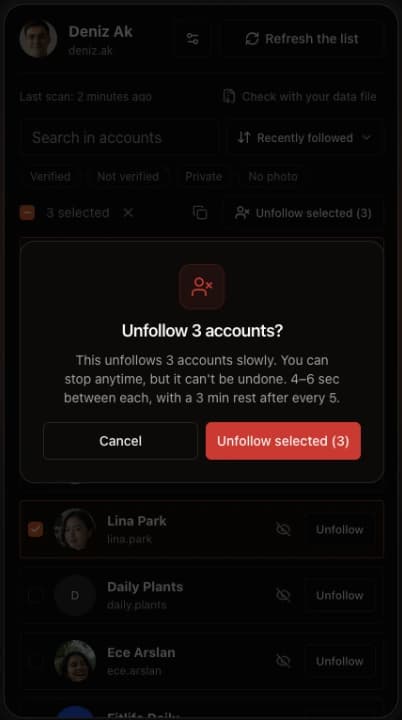
Unfolks compares your followers and following lists right inside your browser, flags every account that never followed back, and lets you unfollow them in bulk.



5/5 from 25,000+ Instagram users
Works in
No dashboards, no subscriptions, and your lists stay on your computer. Just the one job, done well.
Select a few accounts or all of them. By default Unfolks waits 4–6 seconds between unfollows and rests 3 minutes after every 5, and you can change both in Settings.
Checks every account you follow against your followers and lists only the ones that really don't follow you back. Refresh later and it tells you how many may have unfollowed you since the last scan.
If Instagram limits a scan, your progress is kept. Unfolks shows how long to wait, then you resume from where it stopped instead of starting over.
Drop the file from Instagram's "Download your information" and see who doesn't follow you back without sending Instagram a single request.
Filter by verified, not verified, private or no profile photo, sort by when you followed them, and search. Hide the accounts you want to keep so they're never unfollowed in bulk.
Unfolks uses the Instagram session already open in your browser. There is no login form, no account to create, and your lists stay on your computer.
Install Unfolks from the Chrome Web Store. One click, no sign-up, no configuration.
Sign in to Instagram as usual, then click the Unfolks icon. The side panel opens next to the page; click Show unfollowers to scan the account you're signed in to.
Search and filter the accounts that don't follow you back, hide the ones you want to keep, and unfollow the rest at a safe pace.
25,000+ people use Unfolks to keep their following list honest.
“Best tool for managing Instagram followers. It does one thing and it does it properly.”
“Finally found out who wasn't following me back. So helpful — and it took about a minute.”
“Clean interface and works perfectly. Helped me clean up a following list I'd ignored for years.”
Everything people usually want to know before installing.
Email us and a person will answer. Found a bug? Open an issue on GitHub.
No. Unfolks runs inside your own browser session on instagram.com, so it uses the login you already have. You never type your password into the extension, and there is no Unfolks account to create.
Unfolks is built to be careful. By default, bulk unfollows wait 4–6 seconds between accounts and rest for 3 minutes after every 5, and you can slow both down in Settings. If Instagram starts refusing unfollows, Unfolks stops on its own and shows when you can try again instead of pushing on. Instagram decides its own limits, so no tool can promise an account will never be restricted, but going slowly is what keeps the risk low.
Your progress is kept. Short limits are waited out automatically. For longer ones, Unfolks tells you how long to wait, then lets you resume from where the scan stopped instead of starting over. Large accounts can also choose the balanced or careful scan speed in Settings.
Yes. Download your followers and following lists from Instagram's "Download your information" page, then drop the file into Unfolks. It finds who doesn't follow you back on your computer, so there is no risk of a block, and the file is never uploaded. Accounts found this way can't be unfollowed from that screen: open the profile, or run a scan to unfollow them from the list.
No. The comparison happens in your browser and your lists stay on your computer. The only thing the extension sends anywhere other than Instagram is a crash report if something breaks, so the bug can be fixed. See the privacy policy for details.
Yes. Hide them from the list and they are never included in a bulk unfollow. You can bring them back at any time.
Yes. Double-click an account to start selecting, or use Select all, then unfollow the selected accounts in one batch. You can stop the batch at any time, and copy the selected usernames too.
Unfolks is completely free. There is no trial, no paid tier, and no credit card involved.
Unfolks opens in the browser's side panel, so it needs a Chromium browser that supports extension side panels, such as Chrome, Edge or Brave. Browsers without that support, like Opera, can't open it.
Install Unfolks, open Instagram, and see the whole picture right in your browser. Free, no account, no password.
Add to Chrome — it's free